

Accept a team invitation
Join an organization you've been invited to and create your account on Re:InvestorHub.
Someone on your team invited you to join their organization in Re:InvestorHub. This walks you through opening that invitation and creating your account.
Before you start
Section titled “Before you start”You need the invitation email sent to you. Its link is tied to the email address it was sent to, so it only works for you.
Accept the invitation
Section titled “Accept the invitation”-
Open the invitation email and click the link. It opens the invitation.
-
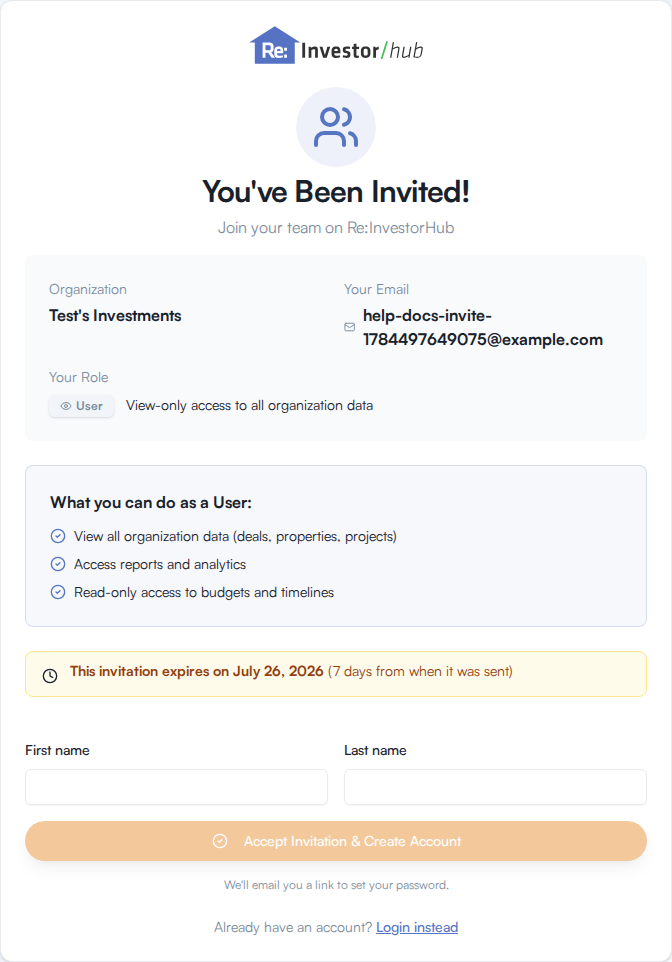
Review the invitation. It shows the organization’s name, the email address you were invited under, and the role you’ve been given: Admin, Power User, or User.
Role What you can do Admin Full access - create work and approve change orders Power User Create work and submit changes for approval User Can edit, can’t approve change orders Under the role badge, the card also lists the specific permissions that come with your role.
-
Note the amber notice on the card telling you when the invitation expires. Invitations expire 7 days after they’re sent.
-
Enter your First name and Last name.
-
Click Accept Invitation & Create Account.
What you should see
Section titled “What you should see”The card changes to You’re in, welcoming you to the organization by name. It tells you a link to set your password has been sent to your email address, and to sign in once you’ve done that.
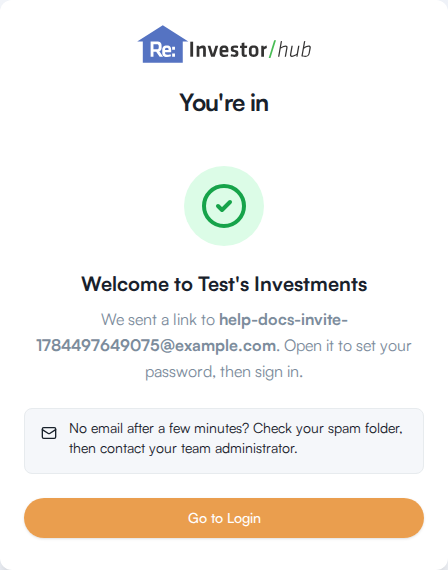
Open the link in that second email to set your password, then return and sign in with your new credentials. Go to Login on the confirmation card takes you there.
If you already have an account
Section titled “If you already have an account”If you already have a Re:InvestorHub account under this email address, don’t fill out the form. Click Login instead, below the form, and sign in normally.
If the invitation doesn’t work
Section titled “If the invitation doesn’t work”The page shows one of these messages depending on what’s wrong with the link:
| What you see | What it means |
|---|---|
| Invalid Invitation | The link is broken or doesn’t match a real invitation. Check the link in your email, or ask whoever invited you to send a new one. |
| Invitation Expired | More than 7 days have passed since the invitation was sent. Ask your administrator for a new invitation. |
| Already Accepted | This invitation has already been used to create an account. Log in instead, or contact your administrator if that wasn’t you. |
| Invitation Revoked | Your administrator canceled the invitation. Contact them if you believe this was a mistake. |
| Something Went Wrong | The invitation couldn’t be checked. Try again, or contact support if it keeps happening. |
Each of these screens gives you a button to go to the login page or contact support.