

Profile and password
What each field on your Profile does, why Email can't be edited there, and how to change your password.
Your profile fields and your password are both on the Settings page. Open Settings from the sidebar (or from your account menu at the bottom of the sidebar, which also has a Profile shortcut). Profile fields are in the Profile Information card at the top; password is in the Security card further down, under Change Password.
Profile fields
Section titled “Profile fields”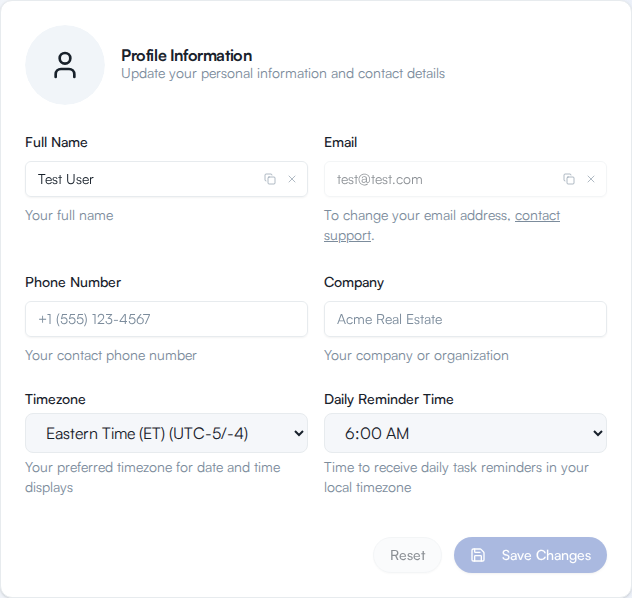
| Field | What it’s for |
|---|---|
| Full Name | Your name as shown across the app. Can’t be left blank. |
| The address on your account. Can’t be edited here, see below. | |
| Phone Number | Your contact phone number. Optional. |
| Company | Your company or organization. Optional. |
| Timezone | Your preferred timezone for date and time displays. |
| Daily Reminder Time | The time of day you receive daily task reminders, in your local timezone. |
Change any of these and click Save Changes. Save Changes and Reset stay disabled until you’ve actually changed something. Reset discards your edits and puts the fields back the way they were; Save Changes submits them. While you have unsaved edits, the page shows “You have unsaved changes” below the buttons. Saving shows a confirmation message once it succeeds.
Why you can’t change your email address
Section titled “Why you can’t change your email address”The Email field is disabled on the Profile form. Its helper text explains why: “To change your email address, contact support.” Use the contact support link right next to the field to request the change.
Change your password
Section titled “Change your password”Change Password, in the Security card, is separate from the Profile form:
- In Security, click the Change Password button.
- A dialog opens asking for your Current Password, New Password, and Confirm New Password.
- Fill in all three and click Change Password.
What you should see: the dialog closes and a confirmation message appears. You don’t need to sign in again, the new password takes effect right away.