

Find and evaluate a property
Review Market Watch leads
# Review Market Watch leads
> Read the Market Watch lead table, filter it, open a lead, log an outcome, pin the best ones, dismiss the rest, and move a lead to My Prospects or the Deal Analyzer.
Once a watch has run, its leads appear on the **Market Watch** tab. This page shows how to read them, narrow the list, record what happens with each one, and move the good ones into your workflow.
> **Note:** You need at least one watch that has run. See [Set up Market Watch](https://docs.reinvestorhub.ai/guides/find-and-evaluate-a-property/set-up-market-watch/).
## Read the lead table
In the sidebar, select **Deal Search**, then the **Market Watch** tab. The table heading shows how many leads there are, for example "Deal Search Results (7 deals found)".
| Column | What it shows |
|---|---|
| Star | Select it to pin the lead to the top. |
| **Rank** | A number in a colored circle. A higher number is a stronger match for your buy box. Green is the strongest, then yellow, then grey. |
| **Address** | The address, the area and the property type. |
| **Price** | The asking price. |
| **ARV** | An estimate of the after-repair value. |
| **Beds**, **Baths**, **Sq Ft** | The basics. A dash means the figure is not available. |
Above the table, **ARV reno** has two choices, **Light +15%** and **Heavy +30%**. They change the ARV figure to reflect a lighter or heavier renovation.
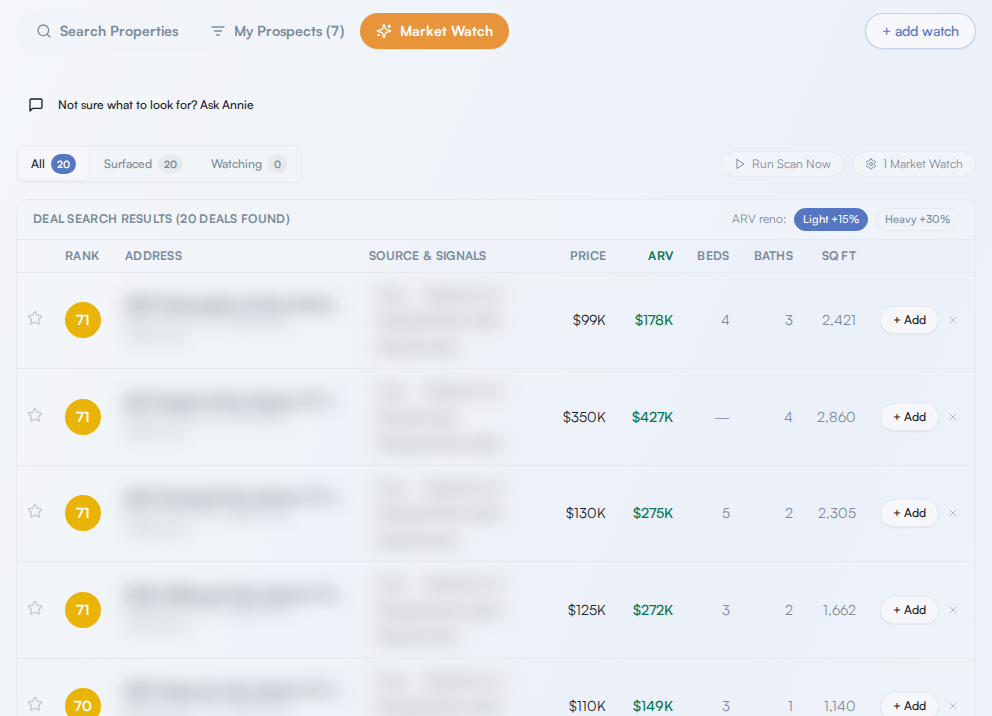
*Addresses are blurred in this example.*
Read the Market Watch lead table, filter it, open a lead, log an outcome, pin the best ones, dismiss the rest, and move a lead to My Prospects or the Deal Analyzer.
Once a watch has run, its leads appear on the Market Watch tab. This page shows how to read them, narrow the list, record what happens with each one, and move the good ones into your workflow.
Read the lead table
Section titled “Read the lead table”In the sidebar, select Deal Search, then the Market Watch tab. The table heading shows how many leads there are, for example “Deal Search Results (7 deals found)”.
| Column | What it shows |
|---|---|
| Star | Select it to pin the lead to the top. |
| Rank | A number in a colored circle. A higher number is a stronger match for your buy box. Green is the strongest, then yellow, then grey. |
| Address | The address, the area and the property type. |
| Price | The asking price. |
| ARV | An estimate of the after-repair value. |
| Beds, Baths, Sq Ft | The basics. A dash means the figure is not available. |
Above the table, ARV reno has two choices, Light +15% and Heavy +30%. They change the ARV figure to reflect a lighter or heavier renovation.
