

Change your password
Change your password from Settings, or reset it from the sign-in screen if you have forgotten it.
Change your password from Settings whenever you want a new one. If you cannot sign in because you forgot it, you can reset it from the sign-in screen instead.
Change your password while signed in
Section titled “Change your password while signed in”In the sidebar, select Settings, then go to the Security card.
Next to Change Password (“Update your password to keep your account secure”), select Change Password. A dialog opens.
Enter your Current Password, a New Password, and the same new password again in Confirm New Password. The new password must be at least 8 characters with uppercase, lowercase, and numbers.
Select Change Password in the dialog.
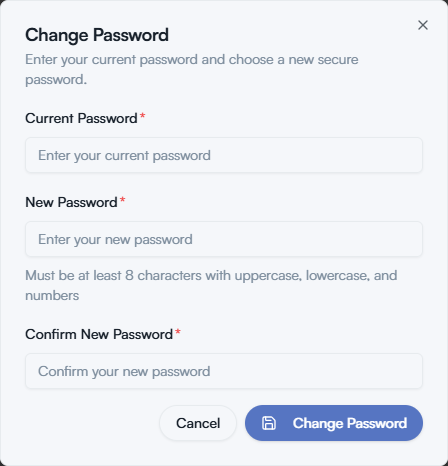
If something is wrong, the dialog marks the field to fix: “Current password is incorrect”, “Passwords do not match”, or “New password must be different from current password”. Correct it and select Change Password again.
Reset a password you forgot
Section titled “Reset a password you forgot”On the Sign In screen, select Forgot password?, next to the Password field.
On Forgot Your Password?, enter your Email and select Send Reset Link. We send the link only to the email address registered on your account, and it expires shortly after it is issued.
Open the email and follow the link. On Reset Your Password, enter a New Password and Confirm Password, then select Update Password.
If something goes wrong
Section titled “If something goes wrong”- The reset email does not arrive. Check your spam folder and that you entered the address on your account. If it still does not arrive, contact support.
- The link has expired. Go back to Forgot password? and request a new one.
- You signed in with Google. Select Continue with Google on the sign-in screen as usual. This guide covers accounts that sign in with a password.
For the fields on the Profile and Security cards, see Profile and password.