

Export a scope of work
Preview a project's scope of work and save it as a PDF to share with contractors and partners.
A scope of work pulls your project’s details, budget, schedule, team, and change orders into one document. Export it when you need to hand a contractor or partner a single page of what the job covers.
Export the document
Section titled “Export the document”In the sidebar, select Projects, then open the project.
Near the top of the editor, select Export Scope of Work. The button reads Generating… while it gathers your data.
A Scope of Work Preview window opens with the project name. Scroll through it to check the content.
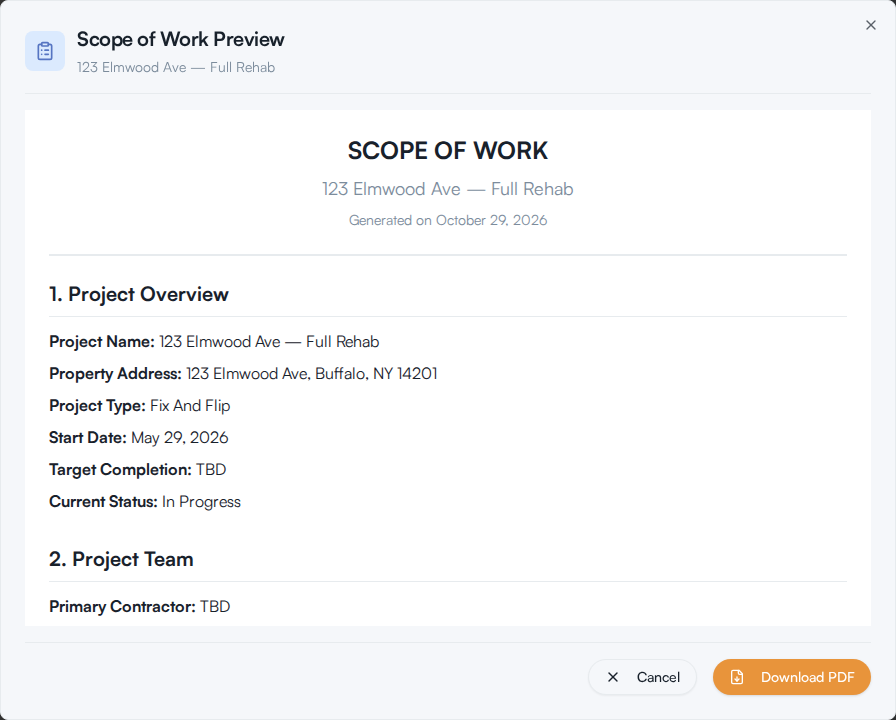
Select Download PDF. A print window opens. In your browser’s print dialog, choose Save as PDF as the destination and save the file.
What the document contains
Section titled “What the document contains”The export is numbered and always uses this order:
- Project Overview: name, address, type, start date, target completion, and current status
- Project Team: your primary contractor, with company, phone, and email
- Budget Summary: total estimated budget, total spent, remaining budget, and whether you are On Budget or Over Budget
- Detailed Budget Breakdown: line items grouped by phase
- Project Timeline and Milestones
- Scheduled Inspections
- Subcontractors
- Change Orders
- Additional Notes
The budget figures include approved change orders, so the document shows what the project actually costs rather than the original plan. The header carries the date it was generated, and the footer notes that the document was generated automatically and should be reviewed for accuracy. Read it through before you send it.
If something goes wrong
Section titled “If something goes wrong”- You don’t see the button. It appears only on a saved project. Save the project first, then reopen it.
- The preview doesn’t open and an error appears. The message reads Failed to generate scope of work document. Try again, and contact support if it keeps happening.
- Nothing happens after Download PDF. Your browser may have blocked the print window as a pop-up. Allow pop-ups for Re:InvestorHub and try again.