

Turn on two-factor authentication
Add a second check at sign-in with an authenticator app or an email code, and turn it off again.
Two-factor authentication asks for a 6-digit code after your password, so a stolen password alone cannot open your account. You turn it on from Settings.
Pick a method
Section titled “Pick a method”The Security card offers two ways to get the code:
- Authenticator app. You need an authenticator app on your phone that makes time-based codes.
- Email code. We send the code to your email at sign-in. You need nothing extra.
Turn it on with an authenticator app
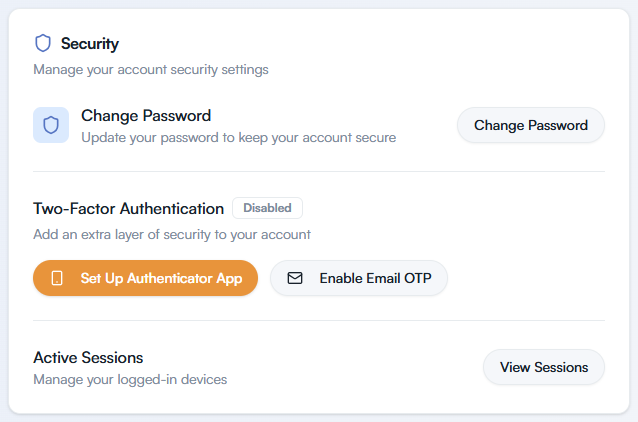
Section titled “Turn it on with an authenticator app”In the sidebar, select Settings, then go to the Security card. Two-Factor Authentication shows a Disabled badge.
Select Set Up Authenticator App. You go to a screen with the same title.
Under Step 1, scan the QR code with your app. If you cannot scan, select Can’t scan? Enter key manually and type the key into the app.
Under Step 2, enter the 6-digit code from your app, then select Confirm Setup.
If you leave setup part way, you see “Authenticator app setup was cancelled.” Select Complete Authenticator Setup to finish.
Turn it on with an email code
Section titled “Turn it on with an email code”In Settings, go to the Security card.
Select Enable Email OTP.
Signing in afterwards
Section titled “Signing in afterwards”Enter your email and password as usual. A verification screen then asks for the code: “Enter the 6-digit code from your authenticator app”, or “Enter the 6-digit code sent to your email”. Enter the six digits and select Verify.
Got a new phone? Select Reconfigure Authenticator in the Security card and scan the new QR code.
Turn it off
Section titled “Turn it off”In the Security card, select Disable MFA.
The Disable Two-Factor Authentication dialog warns that you will only need your password to log in. Select Disable MFA again.
If you lose access to your code
Section titled “If you lose access to your code”If you lost your phone or cannot get the email code, you cannot turn two-factor authentication off yourself, because that needs you to sign in. Contact support for help.